Google Ad Grants for Nonprofits: What It Really Takes
connectNPO · Updated September 2026
Key takeaways
- Google Ad Grants gives qualifying nonprofits up to $10,000 USD per month of in-kind search advertising.
- Government entities, hospitals and healthcare organizations, and schools and universities are not eligible, though their charitable or philanthropic arms can be.
- Accounts must hold a 5% click-through rate each month. Missing it two months in a row leads to temporary deactivation.
- Single-word keywords are not permitted, and keywords with a Quality Score of 1 or 2 must be paused or removed.
- The money is a ceiling, not a budget. Most of the work is keeping the account compliant, not spending the full amount.
You have probably heard the number. Ten thousand dollars a month, from Google, for free. Someone on your board mentions it, or it surfaces in a newsletter, and it lands in that familiar place: one more thing that sounds too good to pass up and too complicated to start.
Then you open the application, and the questions get specific fast. And the quiet worry underneath is not really about the paperwork. It is that you will get the thing, do it badly, and add one more half-finished system to a list that is already long.
Google Ad Grants for nonprofits is a real program, and the headline number is close to accurate. What it is not is free money. Here is the reframe that makes the rest of it manageable.
Google Ad Grants is not a grant you receive. It is a standard you keep meeting.
It behaves less like a check and more like a library card. Nobody hands you the books. You get borrowing privileges, and they continue for as long as you follow the rules of the building. Understand that, and every requirement below stops feeling arbitrary.
What Google Ad Grants actually gives you
Google describes the program as “up to $10,000 USD per month of in-kind search advertising for qualifying nonprofits.” Two words in that sentence do most of the work.
“Up to” means it is a ceiling, not a deposit. Nothing arrives in your bank account, and there is no monthly spend requirement. Google puts the same limit another way: $10,000 a month works out to a daily budget of $329 USD. “Search advertising” means text ads on Google Search results pages. Google describes standard paid accounts, not Ad Grants, as the place for remarketing, image ads, and video ads.
Grant ads also run in a separate auction that clears after paid ads, so they appear either on their own or in positions below paid results.
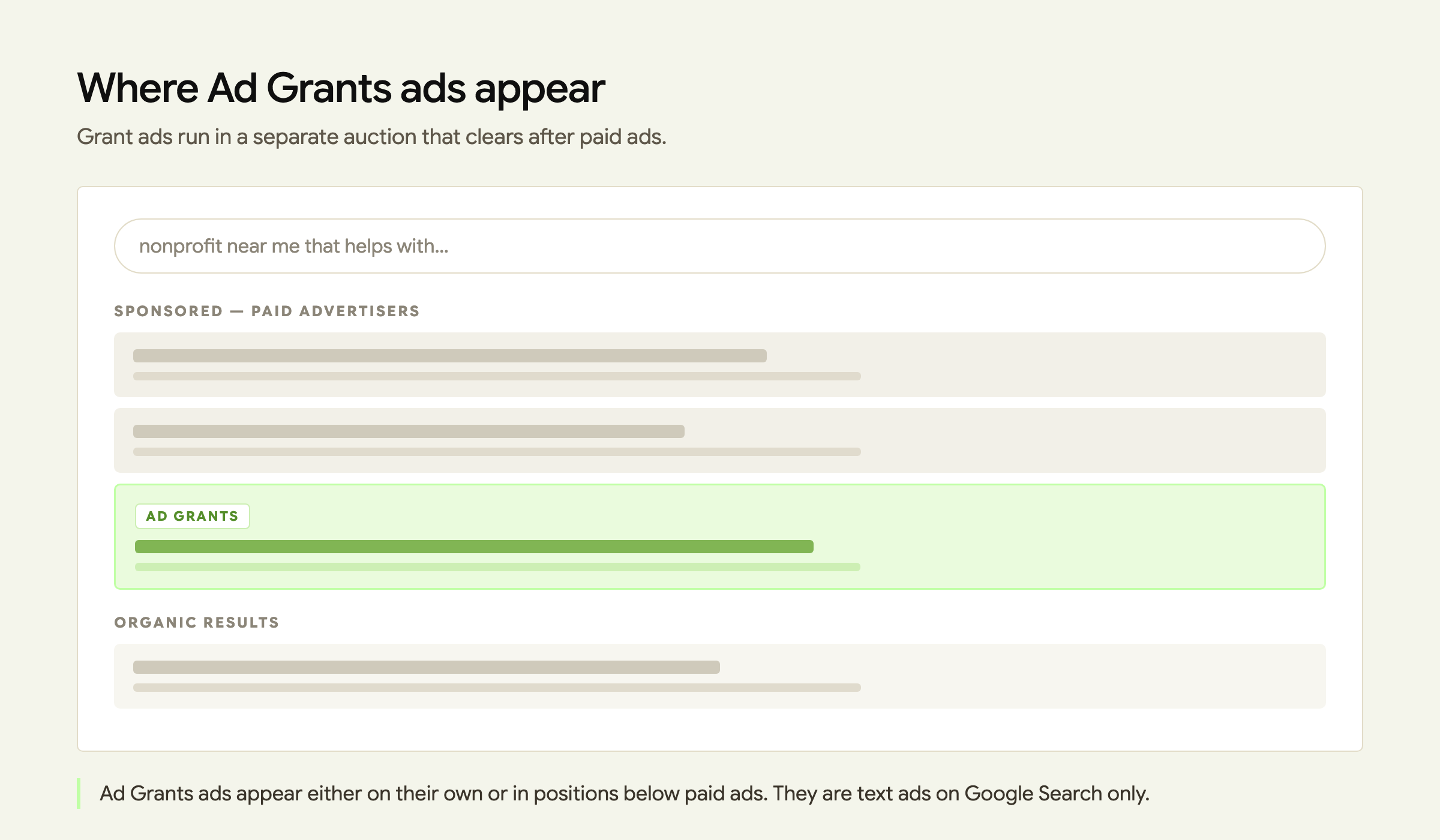
Ad Grants
Text ads on Google Search only. In-kind, no cost. Separate auction after paid ads. No monthly spend requirement.
Paid Google Ads
You pay. Adds remarketing, image ads, and video ads. Competes in the main auction.
Who qualifies, and who does not
You need valid charity status in your country, and you apply through Google for Nonprofits first. Ad Grants is activated from there, using the same login email.
The exclusions are where most applications quietly fail, and they are worth reading before you spend an afternoon on the form. Google’s own eligibility page excludes:
Schools are not being shut out; they are routed elsewhere, to Google for Education. And philanthropic arms are treated separately from the institutions they sit inside, which is why a hospital foundation and a hospital are not the same applicant.
The rules that decide whether you keep it
This is the part that gets skipped, and it is the only part that determines whether the account is still alive next spring. All of it lives in Google’s Ad Grants account management policy. Think of it as a community garden plot. The plot is free. It stays yours because you tend it.
Account requirements, in plain terms
5% click-through rate. Accounts that are not exclusively using Smart Campaigns must hold a 5% CTR each month, measured at the account level, not on every keyword.
At least one conversion per month. Accounts created on or after April 22, 2019 must define at least one meaningful conversion type and record at least one conversion monthly.
At least two unique sitelink assets. A small requirement that is easy to leave undone.
Specific geo-targeting. Ads should run where the information is actually useful, not everywhere by default.
No single-word keywords. Limited exceptions exist, such as brand terms and certain approved medical conditions.
No overly generic keywords. Google’s own examples include “free videos,” “e-books,” and “today’s news.”
No Quality Score 1 or 2 keywords. Pause or remove them. Keywords showing a dash are exempt.
Conversion-based Smart bidding. Required for accounts created on or after April 22, 2019, on every campaign, unless the account uses Smart campaigns.
There is also an annual survey to complete, which is the kind of task that disappears from a busy inbox and takes an account down with it.
Bidding deserves its own note. Ad Grants sets a program-level maximum bid of $2.00 USD, and Google’s policy requires that accounts created on or after April 22, 2019 use conversion-based Smart bidding for every campaign unless they are using Smart campaigns. The permitted strategies are Maximize conversions, Maximize conversion values, Target CPA, and Target ROAS. The useful part: Google allows those strategies to bid above the $2.00 cap when your account’s performance merits it. Which is another way of saying the ceiling loosens for accounts that are actually working.
How accounts actually get deactivated
Google’s policy lists five independent grounds for deactivation: account structure, performance, conversion tracking, bidding, and failure to respond to program surveys. It also warns that any account found violating program policies is subject to automatic suspension without notification. But the most common way a grant quietly dies is the performance one, and it takes about two months.
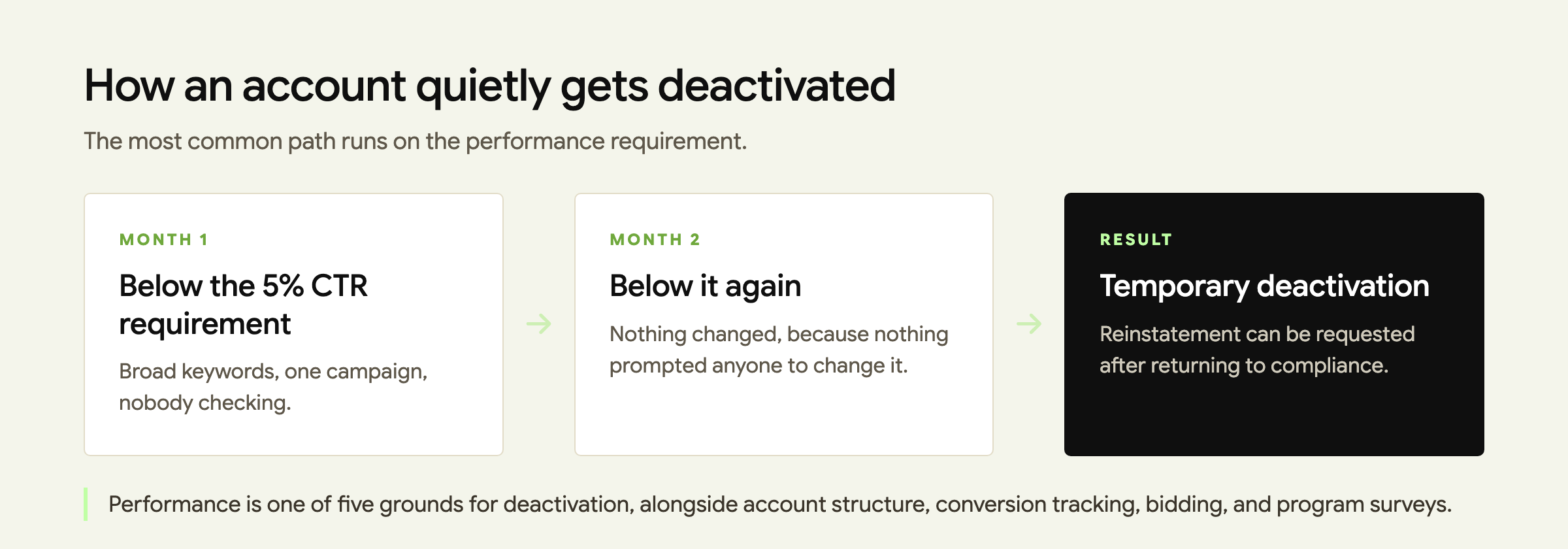
Month 1. The account is set up in a burst of energy. Broad keywords, one campaign, no conversion tracking. CTR lands below 5%. Nobody looks.
Month 2. Nothing has changed, because nothing prompted anyone to change it. CTR is below 5% again.
Deactivation. Two consecutive months under 5% and the account is temporarily deactivated. You can request reinstatement after bringing it back into compliance.
Notice what is missing from that sequence: anyone whose actual job it was to check. The failure is rarely skill. It is ownership.
A realistic first 90 days
Start smaller than the ceiling suggests. A short list you actually run monthly beats a perfect list you avoid.
01
Verify eligibility first
Confirm you are not in an excluded category before filling anything in.
02
Set conversion tracking on day one
Decide what counts: a donation, a volunteer signup, a newsletter subscription.
03
Write to one real question
Specific phrases people actually type. Never single words.
04
Put one monthly check on one calendar
Thirty minutes, one named person. This is the whole compliance system.
There is one more thing worth saying plainly, because it is the part the $10,000 headline hides. Ads send people to a page. If that page is slow, unclear, or asks for nothing, the traffic will not become anything, and your conversion requirement is the first thing to feel it. The grant does not fix a weak landing page. It reveals one.
Is Google Ad Grants for nonprofits worth it?
Often, yes, but not for the reason most people expect. The value is rarely the full ceiling. It is a steady, free channel that tells you what people search for when they need what you do. That information is useful even on the months the ads are quiet.
It is worth it if one person can own thirty minutes a month. If nobody can, the honest answer is to wait until someone can. An account you cannot maintain is not a free $10,000; it is a task that will fail slowly and cost you attention on the way down.
Not sure where you stand
We can look at your site and tell you whether Ad Grants is worth your team’s time.
Ad Grants sits alongside the rest of your digital presence rather than replacing it. See how we work across websites, SEO, and content, or look at what support costs.
Frequently asked questions
How much does Google Ad Grants actually give you?
Google provides up to $10,000 USD per month of in-kind search advertising for qualifying nonprofits. It is a ceiling rather than a payment, and there is no monthly spend requirement.
Which organizations are not eligible for Google Ad Grants?
Governmental entities and organizations, hospitals and healthcare organizations, and schools, academic institutions and universities are not eligible. Schools are directed to Google for Education instead.
What is the 5% click-through rate rule?
Ad Grants accounts that are not exclusively using Smart Campaigns must maintain a 5% click-through rate each month at the account level. Failing to meet it for two consecutive months can result in temporary account deactivation.
Can you get a deactivated Ad Grants account back?
Deactivation is described as temporary. You bring the account back into compliance and can then request reinstatement through Google support. Reinstatement is a request, not a guarantee, and Google reserves the right to grant or deny participation at any time.
Are single-word keywords allowed in Ad Grants?
No. Single-word keywords are not permitted, apart from limited exceptions such as brand keywords and certain approved medical conditions. Overly generic keywords must also be paused or removed.
Program requirements and amounts are set by Google and can change. Verify current details in Google’s official Ad Grants documentation before applying. connectNPO does not provide legal, tax, accounting, or Form 990 advice.