Microsoft 365 for Nonprofits: What Is Free, How to Apply, and the Three Records to Check

connectNPO · Updated October 2026
Key takeaways
- Microsoft gives eligible nonprofits up to 300 licenses of Microsoft 365 Business Basic free, for paid staff and unpaid executives. Business Standard is $3.50 and Business Premium $5.50 per user a month, paid yearly, on Microsoft’s nonprofit pricing page read October 23, 2026.
- The free Business Premium grant has ended. Microsoft announced in May 2025 that the grant would end at each organization’s next renewal on or after July 1, 2025; what remains is free Business Basic and discounts of up to 75% on other plans.
- The application asks for your organization’s website, and Microsoft advises a real, public-facing domain, not a social media page. Microsoft gives two waiting times: up to three days on its Learn pages and up to seven business days on its pricing page.
- We checked the domains of 128 small US nonprofits whose email runs on Microsoft 365. 121 had an SPF record (the list of who may send their mail) that includes Microsoft; only 55 had published DKIM signature records at Microsoft’s default names, and 43 had all three records.
- Microsoft says no DKIM signing occurs for mail from a custom domain until it is set up. It recommends switching DKIM on, then adding a DMARC record at p=none and tightening it after watching the reports.
Say the annual appeal goes out from the new Microsoft 365 account, and a board member writes back that it landed in junk. Before anyone rewrites the letter, one thing is worth checking: three short records in the settings for your web address, the part of your email address after the @.
Microsoft 365 for nonprofits starts with free licenses from Microsoft for Nonprofits, the program behind them, and that part is easy to find. This guide covers what Microsoft offers in 2026, how to apply, and a part that affects whether your mail arrives: when we checked the domains of 128 small US nonprofits whose email runs on Microsoft 365, 43 had all three of those records.
Is Microsoft 365 free for nonprofits? The short answer
Yes, in part. Eligible nonprofits get up to 300 licenses of Microsoft 365 Business Basic free, for paid staff and unpaid executives, with email on their own domain. Business Standard and Business Premium are discounted, not free. The free license does not set up the three records behind your email address; whoever manages your domain’s settings does, who may be the same person who runs your Microsoft account.
The license is the easy part. The records can be left half done, because nothing breaks on the day you skip them.
Microsoft 365 nonprofit pricing in 2026
On Microsoft’s nonprofit pricing page, read October 23, 2026, Business Basic is free for up to 300 users, Business Standard is $3.50 and Business Premium $5.50 per user a month, paid yearly.
| Plan | Nonprofit price | What it adds |
|---|---|---|
| Business Basic | Free (a grant) for up to 300 users | Web and mobile Office apps, email on your own domain |
| Business Standard | $3.50 per user a month, paid yearly | Adds the desktop Office apps |
| Business Premium | $5.50 per user a month, paid yearly | Adds device management and advanced security; Microsoft calls it a 75% discount |
From Microsoft’s nonprofit plans and pricing page, read October 23, 2026. Prices change; check the page before you budget.
All three Business plans are for organizations with 1 to 300 users; Microsoft lists separate enterprise plans for larger ones. The free grant is for paid staff and unpaid executives, and volunteers can use discounted licenses. Microsoft also asks organizations to keep at least 85% of granted licenses in active use (a license is one person’s account) and says those that do not may risk losing future grants. Copilot Chat is included, and the full Microsoft 365 Copilot is a paid add-on.
What changed in 2025
Until 2025, eligible nonprofits could get Business Premium licenses free. Microsoft announced in May 2025 that the Business Premium grant would end at each organization’s next renewal on or after July 1, 2025, and its update notes now say the grant has been discontinued: existing licenses expire at the next renewal date and do not renew. What remains, in Microsoft’s words, is up to 300 granted licenses of Business Basic and discounts of up to 75% on many Microsoft 365 offers, Business Premium among them.
If your organization moved from Premium to Basic, the main changes are these. Basic has the web and mobile Office apps, not the desktop versions, and a smaller mail archive. The extra security tools that came with Premium, such as Defender for Business and Intune, are not in Basic, though Basic still has the built-in mail protection, and multifactor sign-in through Microsoft’s free security defaults; sign-in rules built with Premium’s Conditional Access stop applying. Microsoft’s update notes say to make the move through your current Microsoft partner, or yourself in the Microsoft 365 admin center (the settings screen for your account): add the Business Basic grant, replace each user’s Premium license, then cancel Premium.
Who qualifies for Microsoft for Nonprofits, and what the application asks for
The person who registers must be an employee or a strategic volunteer of the nonprofit. An outside IT provider may not register on the organization’s behalf.
In the US, Microsoft’s eligibility page names 501(c)(3) organizations, public libraries and public museums. It excludes, among others, government bodies, schools and universities, political, labor and fraternal groups, and hospitals and health systems, except some rural hospitals, health centers, clinics and nursing or long-term care facilities. Validation is done by a partner whose name Microsoft does not publish.
The registration form asks for the organization’s legal name, website, mailing address, a phone number that is not a VoIP or call-forwarding service, and a legal identifier, and says the details should match the organization’s legal records and public profile. Microsoft’s tip is to use a real, public-facing domain for the website, not a social media page.
The Microsoft pages we read do not list what the website must show; Google’s nonprofit program does, and our Google Workspace for nonprofits guide covers it. Microsoft gives two waiting times: up to three days on its Learn pages, and up to seven business days on its pricing page.
What we found on 128 small nonprofit domains
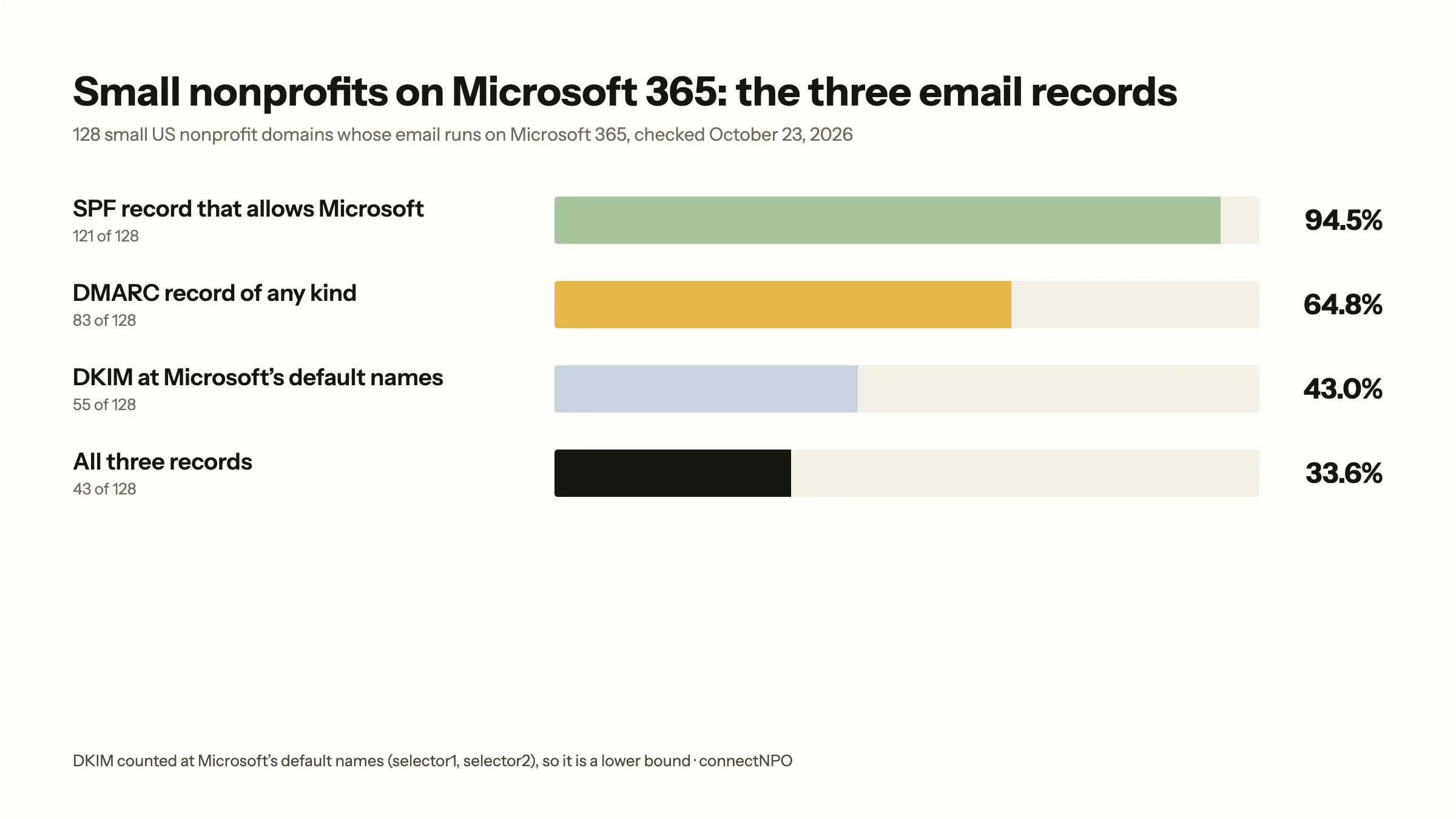
Of 128 small US nonprofit domains on Microsoft 365, 121 had an SPF record that includes Microsoft, 83 had a DMARC record, and 55 had published DKIM records at Microsoft’s default names. 43 had all three as we counted them, and 3 had none of the three as counted (one of them has an SPF record that leaves Microsoft out).
| Record | Domains | Share |
|---|---|---|
| SPF that includes Microsoft | 121 of 128 | 94.5% |
| DMARC record of any kind | 83 of 128 | 64.8% |
| DKIM records at Microsoft’s default names | 55 of 128 | 43.0% |
| All three, as counted | 43 of 128 | 33.6% |
Read through a public DNS resolver. No organization is named.
The domains come from our national panel: small 501(c)(3) public charities with $250,000 to $1 million in revenue, drawn at random from the IRS master file, using the website address each one wrote on its latest Form 990. On October 3, 2026, 129 of those domains had their mail on Microsoft 365; 128 were still there when we read their records on October 23, 2026. We read the records through a public DNS resolver, as in our Google Workspace guide.
Two limits. The DKIM figure counts records published at Microsoft’s default names; a nonprofit that used other names would not show, and DNS cannot show whether signing is switched on. The SPF figure means the record includes Microsoft; we did not test whether each record is otherwise valid. Of the 83 DMARC records, 51 were at p=none, 17 at quarantine and 15 at reject, and 35 named an address for reports. For the rest of what we counted on small nonprofit websites, see our nonprofit website statistics.
The three records that help your email arrive
- SPFLike a list, filed under your return address, of the post offices allowed to mail letters that carry it.A list of the mail systems allowed to send email for your domain. Microsoft’s value is
v=spf1 include:spf.protection.outlook.com -all, and a domain should have only one SPF record; a newsletter tool that sends as your domain needs an entry in it too. - DKIMLike a wax seal pressed with your signet: it shows the letter came from you and was not changed on the way. It does not stop anyone reading it.A hidden signature added to each message, checked against a key you publish on your domain. Microsoft says no DKIM signing occurs for mail from a custom domain until you set it up: add two records with Microsoft’s fixed names,
selector1._domainkeyandselector2._domainkey, then switch signing on in the Microsoft Defender portal. Microsoft’s DKIM guide. - DMARCLike a standing instruction you leave at the post office for letters with no valid return address and a broken seal, with a request to tell you when it happens.A short record that tells receiving inboxes what you want done with mail that fails both checks, and where to send reports.
p=noneasks for no action,quarantineasks for junk,rejectasks for refusal. Microsoft suggests starting atp=noneand moving step by step toward reject. Microsoft’s DMARC guide.
We did not measure why records are missing. Microsoft’s DNS setup page lists the MX record as required to receive mail at all and SPF as optional but highly recommended; DKIM needs two more records and a switch in the Defender portal; and DMARC is not part of the setup steps, though the same page says to set it up after SPF. For large senders the records are required: Microsoft’s Outlook.com support page says domains that send 5,000 or more messages to Outlook.com, Hotmail and Live addresses must pass SPF and DKIM and publish a DMARC record, or that mail is rejected.
A checklist for whoever manages your domain and Microsoft account
Microsoft’s own order, in four steps:
- Confirm the MX record (where incoming mail is delivered) matches Microsoft’s value.
- Check that the domain has one SPF record and that it includes Microsoft, plus any other service that sends your mail.
- Add the two DKIM records, switch signing on in the Defender portal, and check that both records are found.
- Add a DMARC record at
p=nonewith an address for reports; after enough time watching the reports, move toward quarantine.
If newsletters go out through a separate email tool, and it sends as your domain, it needs its own SPF entry and DKIM there, or on a subdomain, which Microsoft recommends for bulk email; our guide to nonprofit email deliverability covers why. These checks are part of what an inbox looks at before it decides between the inbox and junk.
Microsoft 365 or Google Workspace?
Both give eligible nonprofits a free tier with email on their own domain; in our panel, 297 small nonprofits ran their mail on Google and 129 on Microsoft 365. So the choice comes down to two practical questions: which tools your staff already use, and who will look after the domain records.
Google reviews the website before it activates its nonprofit offer, and its policy asks the site to show details such as the organization’s Charity ID, a physical street address and/or a mission statement; Microsoft asks for the website on its form. For Google the website carries the organization’s details to the reviewer; for Microsoft it is part of the public profile the details on the form should match. For what that page should show, see what should be on a nonprofit website; for where it is hosted, nonprofit website hosting.
Our nonprofit website design plan keeps the website current; staff email accounts are not part of it. To see the kind of site a reviewer finds, open our nonprofit website examples.
Frequently asked questions
Is Microsoft 365 free for nonprofits?
Partly. Microsoft gives eligible nonprofits up to 300 licenses of Microsoft 365 Business Basic free, for paid staff and unpaid executives, with web and mobile versions of the Office apps and email on your own domain. Business Standard and Business Premium are discounted, not free.
How much is Microsoft 365 for nonprofits?
On Microsoft’s nonprofit pricing page, read October 23, 2026, Business Basic is free for up to 300 users, Business Standard is $3.50 and Business Premium $5.50 per user a month, paid yearly. Check the page before you budget, because prices change.
Does Microsoft offer discounts to nonprofits?
Yes. Microsoft says it offers discounts of up to 75% on many Microsoft 365 plans for nonprofits, including Business Premium, alongside the free Business Basic licenses. Volunteers can use discounted licenses; the free grant is for paid staff and unpaid executives.
How long does Microsoft nonprofit approval take?
Microsoft gives two figures: up to three days on its Learn pages, and up to seven business days on its pricing page and FAQ, depending on the country and how quickly the organization answers any request for documents.
Do we need DKIM for Microsoft 365?
Microsoft says no DKIM signing occurs for outbound mail from a custom domain until you set it up, and it recommends SPF, DKIM and DMARC together. In our check, 55 of 128 small nonprofit domains had published DKIM records at Microsoft’s default names.
See your finished website before you pay for it.
A website we design, write and keep current, with your story and your numbers in it. You pay nothing until you approve the finished site; the first payment is then $1,180 (the build fee plus the first month), and $180 a month after that.
See the plan and apply →Microsoft offers, prices and rules from Microsoft’s own pages, read October 23, 2026; check them before you decide. Mail-service counts from October 3, 2026, and email-record counts from October 23, 2026, for small US 501(c)(3) public charities in our national panel; no organization is named. connectNPO is not affiliated with Microsoft. This guide is general information, not legal, tax or IT security advice.