AI for Nonprofits: Six Small Jobs That Give Time Back to the Mission
connectNPO · Updated October 2026
Key takeaways
- In Virtuous’s 2026 report, a survey of 346 nonprofits in December 2025, 92% used AI in some way, and only 7% of those reported a major improvement in their ability to achieve their mission. Getting the tool is not the problem. Giving it a regular job is.
- We ran six small jobs through an AI assistant on October 28, 2026, once each, on sample material: a website update, an event recap with photo descriptions, a thank-you letter, board minutes, a grant report section and a monthly money summary for a board.
- 4 of the 6 answers kept to the facts they were given. 2 added details that were not in the input, a time of day and a list of what a gift buys, and both were caught by reading the answer beside the input.
- The time savings come from what you do before and after the prompt: give the assistant something quick to make, like a photo and thirty seconds of talking, then have a person check the result against the facts before it goes anywhere.
- Every prompt in this guide can be copied as it is. The same three rules apply to all six: keep names and private details out, ask the assistant to mark what it is unsure of, and have a person check before anything is sent.
It is Thursday afternoon. The open studio was on Saturday and the photos are still on someone’s phone. Three donors gave online this week and all got the same automatic receipt. The board packet is due Monday. Somebody on the team tried ChatGPT last spring, it wrote a decent paragraph, and Thursday did not change.
That is the gap in advice on AI for nonprofits: not whether to use it, but how to attach it to the jobs a small staff already does every week, so the time goes back to the mission: the programs, the people you serve, the work only your team can do.
AI for nonprofits: nine in ten use it, four in five ad hoc
In Virtuous’s 2026 Nonprofit AI Adoption Report, based on a survey of 346 nonprofits in December 2025, 92% were using AI in some capacity, and only 7% of those reported major improvements in their ability to achieve their mission. 81% used it ad hoc, without writing down what works, and 47% had no AI governance policy. Among organizations not yet using it, the barriers named most were lack of training (48%), needing guidance on getting started (44%) and concerns about capability (44%).
Our reading: the tool is in the building, but it has no regular job. AI used for the same task every Monday, with the same saved prompt, is like a recipe card taped inside the cupboard door: no one has to remember how, and the steps are the same each time.
So this guide does not rank tools. It shows six small jobs end to end: the input, the exact prompt, the real answer, and what a person had to fix.
How AI is used in nonprofits: six small jobs we tested
On October 28, 2026 we ran each job once through an AI assistant (Claude, in a fresh session with no memory of earlier work and nothing but that job’s own input; for the photo job it could open the five photos), using sample material from Harborlight Youth Arts, one of our fifteen invented sample organizations. The money summary used Riverside Youth Arts, an invented sample from GivingArc. We did not rerun anything to get a better answer, and we read every answer against the input it was given.
| Job | What came back | What we had to fix |
|---|---|---|
| Website update from a voice memo | A short update with two [check] marks | Added “2 p.m.” to a time the memo gave only as “by two” |
| Event recap and photo descriptions | A recap and five photo descriptions | Nothing; no names or ages guessed |
| Thank-you letter for a monthly gift | Five sentences with [First name] where the name goes | One sentence listed what the gift buys; two more made small promises the input never made |
| Board minutes from a transcript | One decision, a task list and eight [check] marks | Nothing invented; one item had lost its answer when we removed a name |
| Grant report section from twelve updates | About 320 words in date order (we asked for under 250) | Over the word limit; every number appears in the updates |
| Monthly money summary for a board | Five short paragraphs and a discussion item with two questions | Nothing; every figure matches the sample statement or follows from it by simple arithmetic |
4 of the 6 stayed inside the facts they were given. 2 added details. Neither was a big error, but both would have reached a website or a donor’s inbox if no one compared the draft to the facts. That is the case for the check: read the answer beside the input.
Website updates from thirty seconds of talking
The update that never gets written is a blank-page problem. Skip the page: take one photo, open your phone’s voice recorder, and talk for thirty seconds about what happened, as if telling a colleague. Some phone voice recorders can turn the recording into text; check yours.
Then give the text to the AI assistant your team already uses (we do not sell one) with a prompt, which is simply the instruction you type to it:
Prompt to copy
Turn this voice memo into a website update for a small youth arts nonprofit. Plain words, under 100 words, one short title. Keep only facts that are in the memo. Mark anything uncertain with [check].
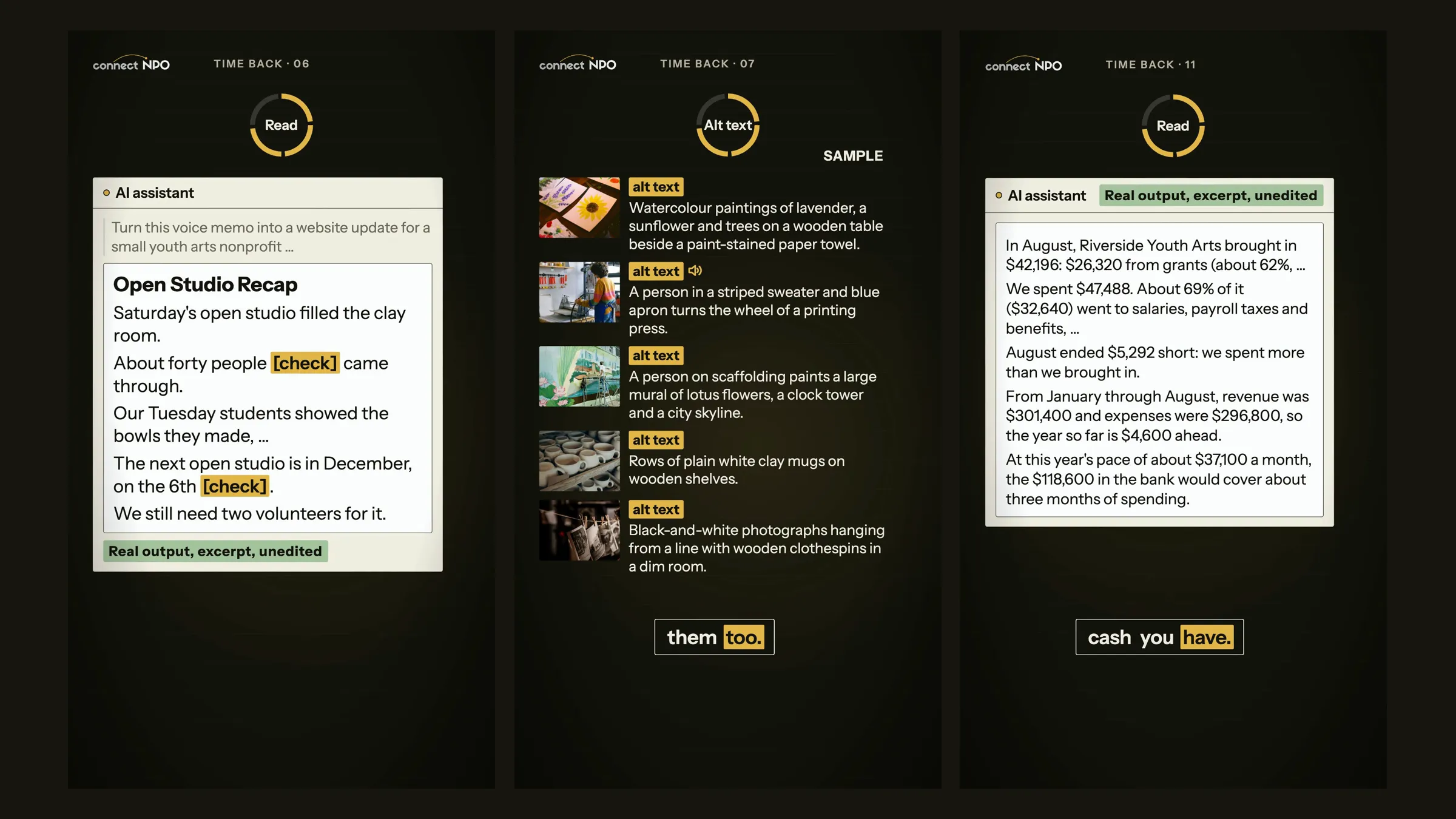
What came back (excerpt, unedited)
“Saturday’s open studio filled the clay room. About forty people [check] came through.”
The memo hedged twice, on the head count and on the date of the next open studio, and the answer put a [check] on exactly those two points. It also turned “by two” into “by 2 p.m.”, which the memo never said. Fix that, and the update is ready. If we run your website, send the checked draft through our change-request form and it is on your site by the next business day. Not on our plan? Any nonprofit can send us notes and photos once, free, and get back a ready-to-paste update and a short video within five business days. How often to update a nonprofit website has our count of what goes stale first.
Event recaps and photo descriptions
Picture forty photos from Saturday and not one word on the website. Pick five, write three lines (what happened, who it was for, what is next), and give both to the assistant. Ask for the recap and one sentence that describes each photo.
Prompt to copy
Write a recap of this event for our website, under 90 words, from these three lines and five photos. Then write one alt-text sentence per photo, under 20 words each. Describe what is visible; do not guess names or ages.
What came back (excerpt, unedited)
“A person in a striped sweater and blue apron turns the wheel of a printing press.”
Those sentences are called alt text: a short description of a photo that software reads aloud for people who cannot see it, and that search engines read too. The instruction “do not guess names or ages” matters most on youth sites. A description such as “Maya, 12, at the press” puts a child’s name and age on a public page; “a person turns the wheel of a printing press” does not. Check each sentence against its photo.
Thank-you letters that are not copies
“Dear Friend, thank you for your generous gift” reads like what it is, the same letter as last month. A better letter names what the gift does, and the assistant can write it if you tell it three things: the amount, the program, and what that amount pays for. Your donation page may already say the third one; the sample give panel on Harborlight’s donate page lists what each amount covers.
Prompt to copy
Write a thank-you email of five sentences for this monthly gift. Say what the gift pays for in concrete words. Use [First name] where the donor’s name goes. Warm, plain, no exclamation marks.
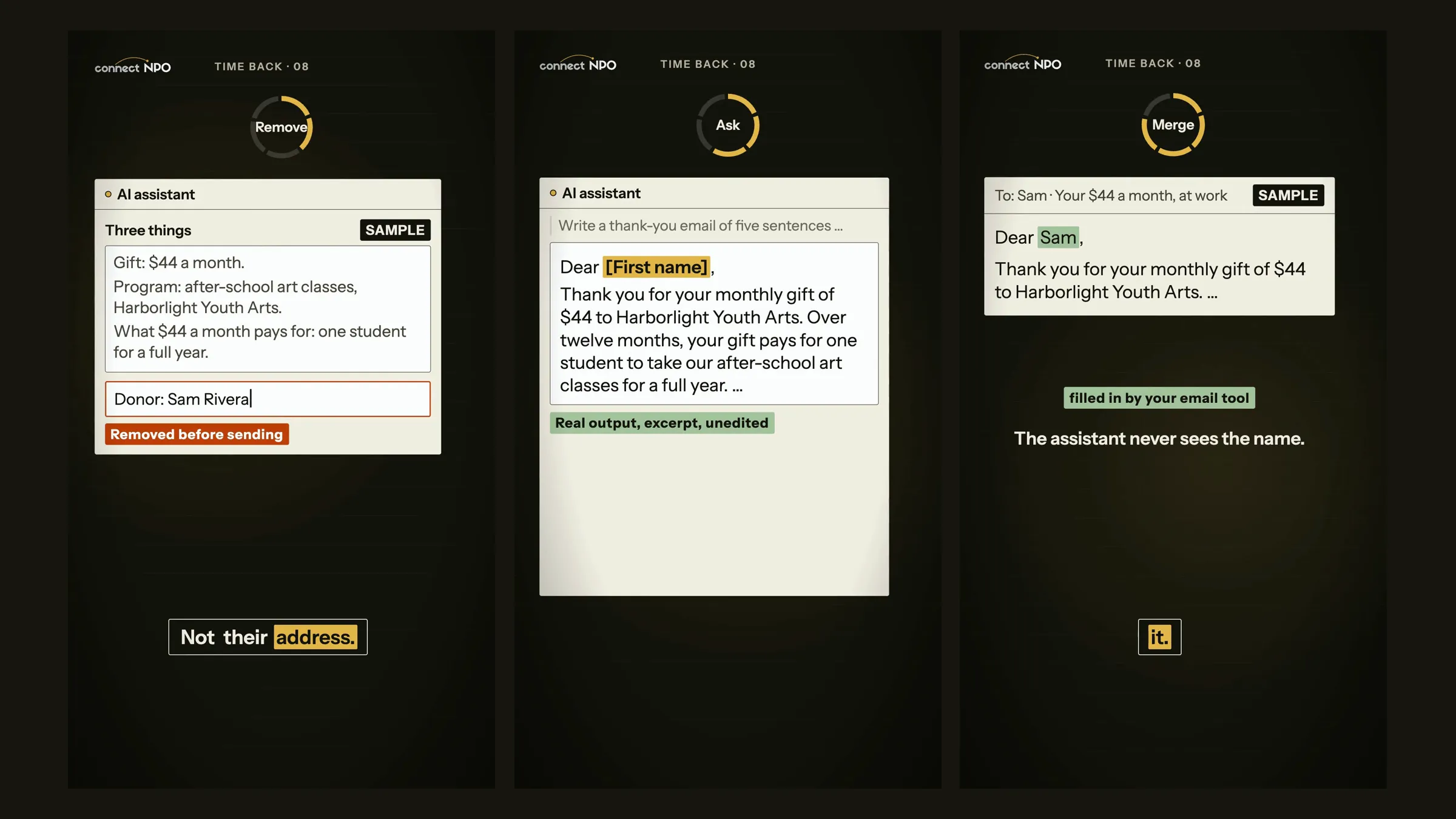
What came back (excerpt, unedited)
“Over twelve months, your gift pays for one student to take our after-school art classes for a full year.”
Notice what is not in the prompt: the donor’s name and address. The letter has [First name] where the name goes, and your email tool fills in the real name when it sends. Think of the prompt as a mail slot: the assistant only gets what you push through it, so the donor’s name stays on your side of the door.
This was one of the two answers that added something. The next sentence promised “a seat at the studio table every week, plus the paint, paper and clay they work with, and a teaching artist beside them”. Believable, warm, and not something we told it; two later lines made smaller promises of their own. If your program does not work that way, delete the sentence or make it true.
Updates, recaps and thank-you notes all end up somewhere a donor or funder can see them. Click through our fifteen sample sites to see websites built to hold them.
Board minutes and the monthly numbers
Two board jobs fit the same pattern. The first is minutes. Many video-call tools can produce a transcript, on paid plans in some cases; the assistant can turn it into decisions and tasks. Before pasting, take out what does not belong in a shared draft: staff matters, health details, names that do not need to be there.
Prompt to copy
From this board meeting transcript, write draft minutes: Decisions, then Actions as a table (task, who by role, due date). Only what was said. Mark anything unclear with [check].
The answer recorded one decision (the winter show date), noted that the van question was left for the next meeting, built a task table, and placed eight [check] marks where the transcript was vague: no date, no year, no a.m. or p.m., a task with no owner. One item taught us something. We had deleted a line naming a donor, but the question that line answered was still there, so the draft listed “Matching gift” with no answer and a [check]. When you remove a line, read the line before it too. The secretary still checks the draft, and the board still approves the minutes, the same as always.
The second job is the monthly numbers. Paste last month’s income and expense report (your statement of activity) and your cash balance, with any donor names removed, and ask for plain sentences and a question for discussion.
Prompt to copy
From this month’s statement of activity and cash balance, write five plain sentences for a nonprofit board: where the money came from, where it went, the month’s result, the year so far, and about how many months of spending the cash covers at this year’s pace. Then one question the board could discuss. Use only these numbers. Do not give accounting or tax advice.
What came back (excerpt, unedited)
“At this year’s pace of about $37,100 a month, the $118,600 in the bank would cover about three months of spending.”
Every figure in that answer matches the sample statement or follows from it by simple arithmetic, and it did not invent a program percentage that the statement does not contain. Your bookkeeper still checks every number against the books before the packet goes out. GivingArc, our sister practice, also turns the books into a monthly board page that writes sentences like these; see its sample, and its free nonprofit tools. GivingArc and connectNPO are both run by Daybooks Web Solutions, LLC.
connectNPO does not provide legal, tax, accounting, or Form 990 advice.
Grant reports from a year of updates
A grant report asks what you did all year, and the answer is scattered across inboxes. If you posted one short update a month, your website already remembers it. Copy the twelve updates into the assistant and ask for the activities section.
Prompt to copy
Write the “Activities this year” section of a grant report from these twelve monthly updates. Date order, under 250 words. Use only facts in the updates; do not add numbers.
What came back (excerpt, unedited)
“In January we reported that 1,140 young people came to Harborlight last year, each counted once.”
We checked every number in the answer, in figures and in words, against the twelve updates and found each one there. It did ignore the length limit, at about 320 words. You should also check each number against your own records; if one disagrees, your records win. The same updates can feed an impact report.
Three rules for AI at a small nonprofit
- Keep names and private details out. Write with [First name] where a name goes and let the tool that sends the message fill it in. Leave out staff matters and health details entirely. If your organization is covered by HIPAA, ask your compliance lead or lawyer before any patient information goes near an AI tool.
- Ask the assistant to mark what it is unsure of. Ending the prompt with “Mark anything uncertain with [check]” put two flags on our website update, and the same line with “unclear” put eight on our board minutes, each in a place where the input really was vague.
- A person checks before anything is sent. Read the answer against the facts you gave it, not against what sounds right. Treat it like a new volunteer’s first draft.
Save each prompt in a shared document and paste it into whichever assistant you already use. Six saved prompts and three rules work as a small AI policy, and a start on the governance policy that 47% of organizations in that survey did not have. The minutes they give back belong to your programs and the people you serve. Curious what assistants say about your organization itself? Read nonprofit AI visibility.
To use Claude or ChatGPT at a nonprofit price, your organization applies first. Our free Claude for Nonprofits guide shows every screen of that application, and if an application for any software discount stalls, tell us where it stopped; we reply by email, free.
Frequently asked questions
How is AI used in nonprofits?
Small nonprofits use AI for the writing jobs that repeat: website updates, event recaps with photo descriptions, thank-you letters, board minutes, grant report sections and monthly money summaries. Pick one job, save one prompt for it, ask the assistant to mark anything uncertain, and have a person check the answer before it goes out.
Which AI tool is best for nonprofits?
For small writing jobs like these, the one your team already has. The prompts are plain sentences, so you can paste them into ChatGPT, Claude, Copilot or Gemini. We ran all six in one assistant, Claude, and both mistakes were caught by reading the answer against the input, not by the choice of tool.
Is it safe to put donor information into AI?
Keep names, addresses, phone numbers and health details out. Write the letter with [First name] where the name goes and let your email tool fill in the name when it sends. If your organization is covered by HIPAA, ask your compliance lead or lawyer first. This is not legal advice.
Can AI make mistakes in nonprofit writing?
Yes. In our test of six jobs on October 28, 2026, two answers added details that were not in the input: a time of day, and a list of what a monthly gift buys. Reading each answer beside the facts you gave it catches this.
Does connectNPO write grants or newsletters?
No. We design, write and keep current one website for each nonprofit we work with. This guide shows small jobs your own staff can do with an AI assistant; the website is where the results show up.
Method in short: six jobs, one run each, on October 28, 2026, in one AI assistant with nothing but each job’s own input (the five photos for the recap); sample material only, from invented organizations. Every quoted line is copied from the saved answer. Survey figures are from Virtuous’s 2026 Nonprofit AI Adoption Report. connectNPO does not provide legal, tax, accounting, or Form 990 advice.
Your updates need somewhere to land.
The AI is yours. We design, write and keep current the website it feeds: send us the checked draft and small updates like these go live within one business day. One plan, $180 a month, and the $1,000 build fee is paid only after you approve the finished site.
See the plan and apply →See how the plan works, or read what should be on a nonprofit website and how small nonprofits set up a newsletter.